JWT Token Authentication
JWT authentication lets your users sign requests with tokens issued by your identity provider, while Comet continues to authorize calls with your existing API keys. Use it when you need short-lived credentials and centralized revocation.
Who can enable JWT authentication?
- Comet Cloud: Enterprise plans only
- Single-tenant deployments: Available for all organizations
Enable JWT authentication
You configure JWT in Admin dashboard → Organization settings → JWT Authentication.
Open the configuration panel.
Use the toggle to enable JWT for your organization.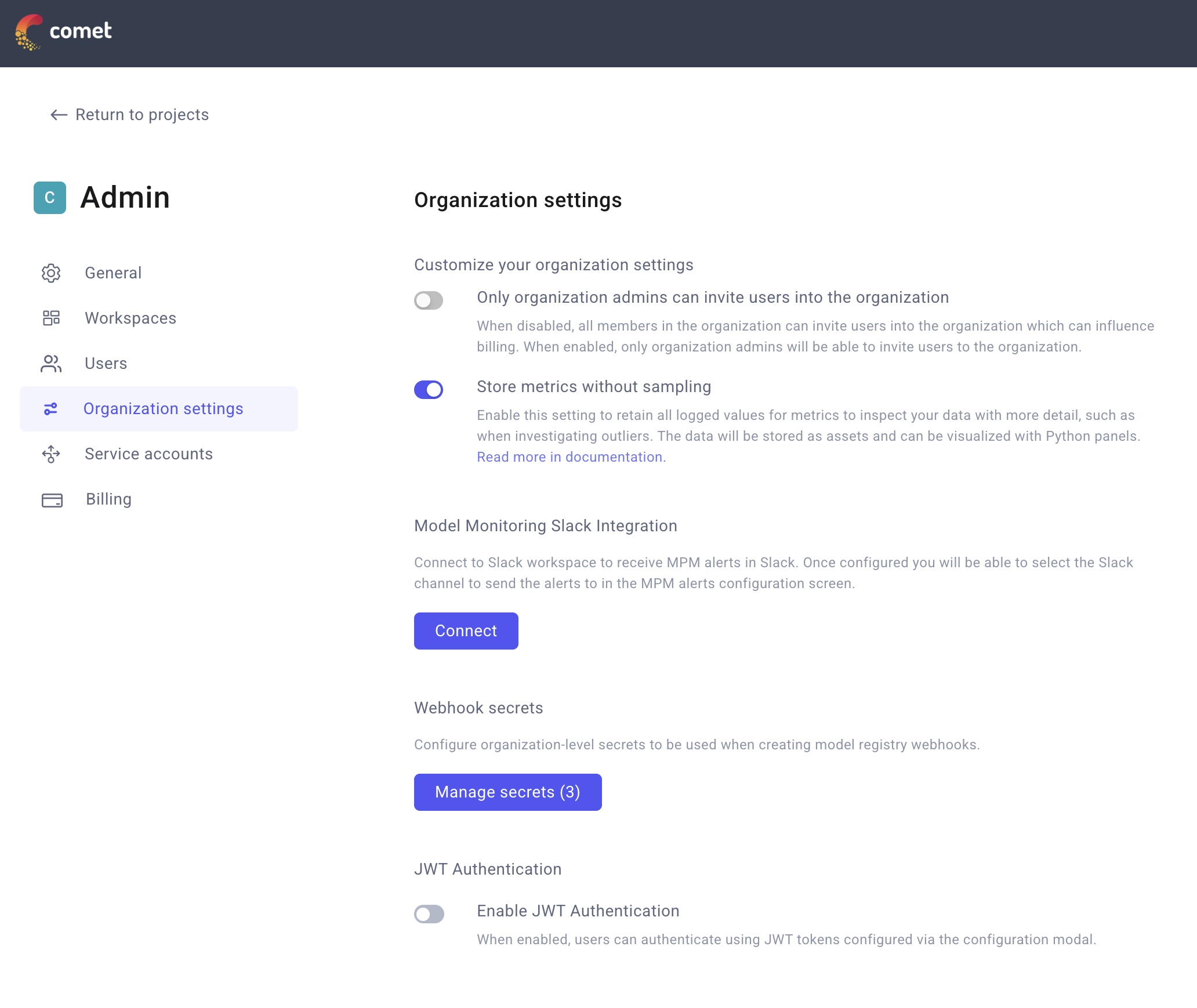
Enable JWT authentication from Organization settings. Choose how Comet should validate tokens.
JWKS URI (recommended): Enter the full HTTPS URL where your identity provider publishes its JSON Web Key Set (for example,
https://auth.example.com/.well-known/jwks.json). Comet downloads and caches every key it finds there.Static public key (single-tenant only): Paste a PEM-formatted RSA or EC public key, including the
-----BEGIN PUBLIC KEY-----and-----END PUBLIC KEY-----lines. Use this option only when you rotate keys manually.
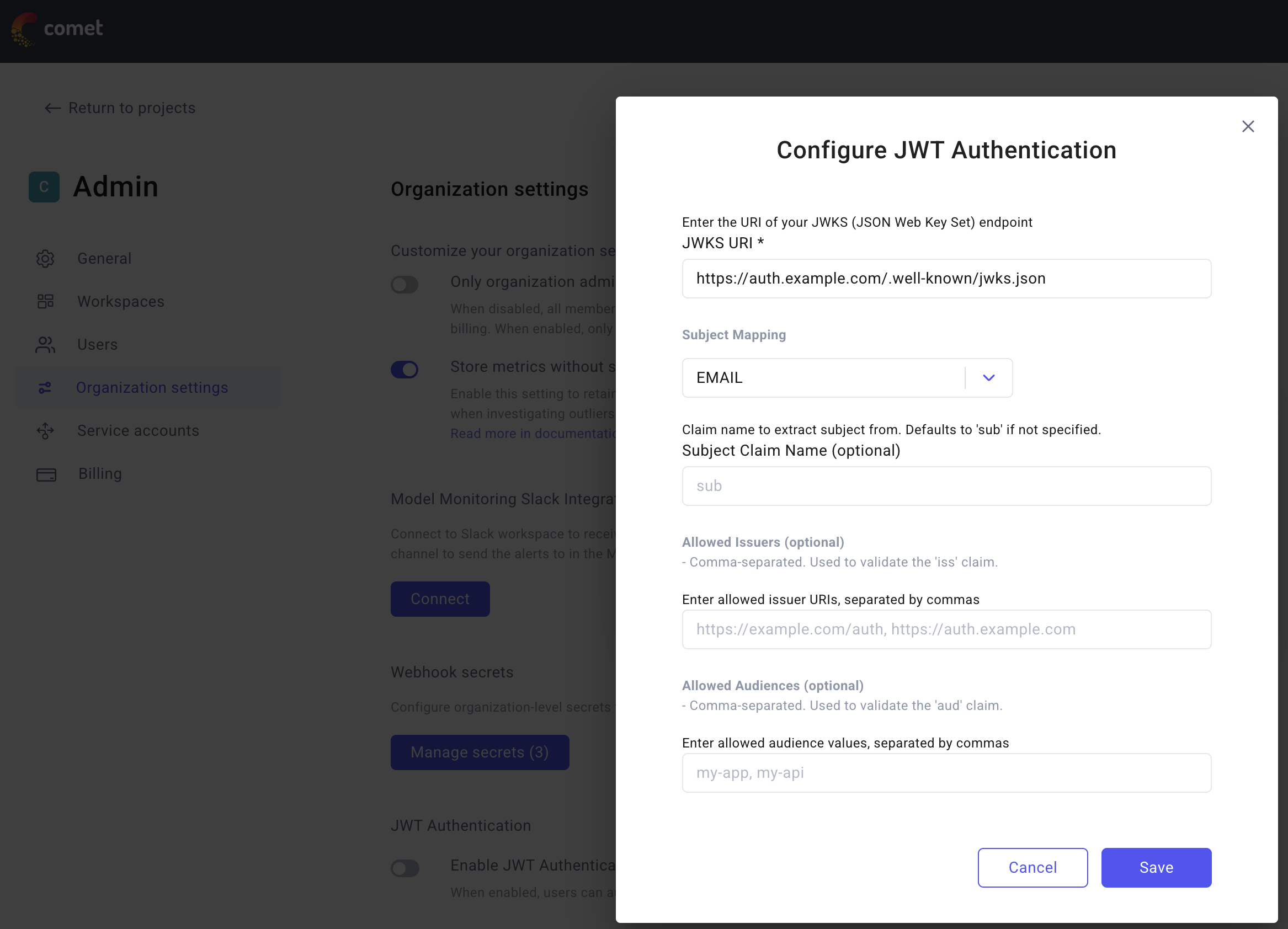
Provide either a JWKS URI or a static public key. Map tokens to Comet users.
- Subject mapping type (
subjectMappingType): SelectEMAILwhen the claim holds an email address, orUSER_NAMEwhen it holds a Comet username. Comet uses this to locate the user record. - Subject claim name (
subjectClaimName): Leave this field blank to use the standardsubclaim. Set it only if your IdP stores the user identifier in another claim (for example,emailorpreferred_username).
- Subject mapping type (
(Optional) Restrict issuer or audience.
- Allowed issuers (
allowedIssuers): Provide one or moreissclaim values that Comet should accept. Leave the field empty to allow any issuer. - Allowed audiences (
allowedAudiences): Provide one or moreaudclaim values that must appear in the token. Leave it empty when you do not need audience filtering.
- Allowed issuers (
Save the configuration. Comet validates the form, fetches the JWKS (if provided), and enables JWT authentication once every field passes validation.
Configuration rules
- Provide either a JWKS URI or a static public key—never both.
- Static keys are supported only for single-tenant environments.
- Each JWKS URI must be unique across organizations and reachable by Comet.
How JWT validation works
Comet enforces the following checks when a token is presented:
Find the organization
- Single-tenant: The organization is implied.
- Comet Cloud: The JWT header must include a
kidthat matches a stored key.
Retrieve the configuration – Comet loads the saved settings and verifies the feature is enabled.
- Verify the signature – Comet resolves the signing key from the JWKS or static key and validates the signature.
- Validate claims – Tokens must be unexpired, and any configured issuer or audience restrictions must pass.
- Map the subject – Comet extracts the configured subject claim and matches it to a user by email or username.
- Confirm membership – Authentication succeeds only if the mapped user belongs to the organization.
If any step fails, the request is rejected and the relevant error is logged.
Key rotation and caching
Comet periodically refreshes cached keys for all organizations that supply a JWKS URI. The default refresh interval is one hour.
- Adjust the rotation cadence with the
JWKS_CACHE_UPDATE_SECONDSenvironment variable. - Control the fetch timeout with
JWKS_FETCH_TIMEOUT_MS(default 60 seconds).
Static keys are not rotated automatically. Replace the saved PEM key in the UI whenever you roll your signing keys.
Use JWT tokens with Comet
JWT tokens work wherever an API key is accepted today. We recommend the standard bearer header:
Authorization: Bearer <jwt-token>
Comet also accepts tokens without the Bearer prefix, in the Comet-Sdk-Api header, or as the cometApiKey query parameter so existing scripts stay compatible.
Behind the scenes Comet validates the JWT, identifies the user, and forwards the call using that user's active API key. This keeps permissions and audit trails aligned with your existing API key workflow.
Python SDK examples
You can use JWT tokens with the Python SDK in two ways:
1. Environment variable configuration
Set the COMET_API_KEY environment variable to your JWT token:
import os
import comet_ml

# Set JWT token as environment variable
os.environ["COMET_API_KEY"] = "your-jwt-token-here"

# Start an experiment
experiment = comet_ml.start(project_name="my-project")
experiment.log_metric("loss", 0.42)
2. Parameter in SDK functions
Pass the JWT token directly as the api_key parameter:
import comet_ml

# Pass JWT token as parameter
experiment = comet_ml.start(
    api_key="your-jwt-token-here",
    project_name="my-project"
)
experiment.log_metric("loss", 0.42)